
PRUServices
Do I need to create a PRUServices account and how do I create one?
If this is your first time logging into PRUServices, it is likely that you will need to create an account. As part of enhanced security requirements, we’re unable to directly migrate existing PRUaccess accounts to PRUServices. To better protect your personal information, all customers are required to validate their email address before accessing PRUServices, which is why registration is necessary.
Important: Do not select “Forgot Password”, “Forgot Username”, or “Sign in with Singpass” until after your PRUServices account is successfully created/ verified.
The account creation/ verification is a one-time process for all first-time users on PRUServices.
Here are the steps to create/ verify your account:
- Visit PRUServices
- Click on Create account
- Select your ID type, then enter your Identification Number (NRIC/FIN/Passport) and Date of Birth in the format DD/MM/YYYY.
E.g.: If your date of birth is 2 Jan 1999, you should enter 02/01/1999. - Enter the One time Password (OTP) sent to your registered mobile with us.
Note: If your mobile number is not shown, it is likely that either your mobile number is not updated with us or you’ve entered the information on the previous screen wrongly. - If a valid PRUServices account exists, you will be directed to Log In.
You may then proceed to sign in with Singpass. - If you do not have a valid PRUServices account, enter a unique email address for your Username.
Note: If you encounter the error message “Email in Use”, it is likely that it has been used for another PRUServices account. - Enter the OTP sent to your email to verify your email address.
- Once verified, choose your password and complete your account creation. You can then proceed to log in with Singpass, or Email & Password for future logins.
For detailed FAQ, please click here.
Why did I not receive any OTP?
Here are some of the potential reasons why you are not receiving an OTP:
- You clicked on “Forgot Username” or “Forgot Password” before creating your PRUServices account.
If a PRUServices account does not exist yet, OTP will not be sent to your registered mobile/email. Please refer above for the steps to create your PRUServices account. - Your network or email provider is blocking the OTP.
Poor network coverage, SMS delays, or email spam filters by your telco and/or email provider may prevent the OTP from reaching you. If the issue persists, please check with your mobile or email service provider.
For detailed FAQ, please click here.
Will payment history be available?
Yes. You can view your payment history under Payments → Payment history.
Payment history for the past 2 years will be available for viewing on PRUServices.
For detailed FAQ, please click here.
Why can’t I submit a claim?
Claim submission on PRUServices is only available for selected policies that support online claim filing. You will be able to select these eligible policies directly within PRUServices.
If you do not see any policies, or do not see the applicable policy listed for claim submission, please contact your servicing Financial Representative, who can assist you with submitting your claim.
For detailed FAQ, please click here.
Will history of claims submitted on PRUaccess be available?
Yes. You can view your past claim submissions, including those submitted on PRUaccess by going to Claims → Track Claims. Claims submitted within the past 2 years will be available for viewing.
For detailed FAQ, please click here.
Will I be able to generate my Revised Benefit Illustration and Quarterly Surrender Value?
Yes. You may request for a Revised Benefit Illustration (RBI) or Quarterly Surrender Value (QSV) document by following these steps:
1. Go to Documents – On the homepage, click ‘Document’ in the top navigation bar. Select the type of document you wish to request from the dropdown menu.
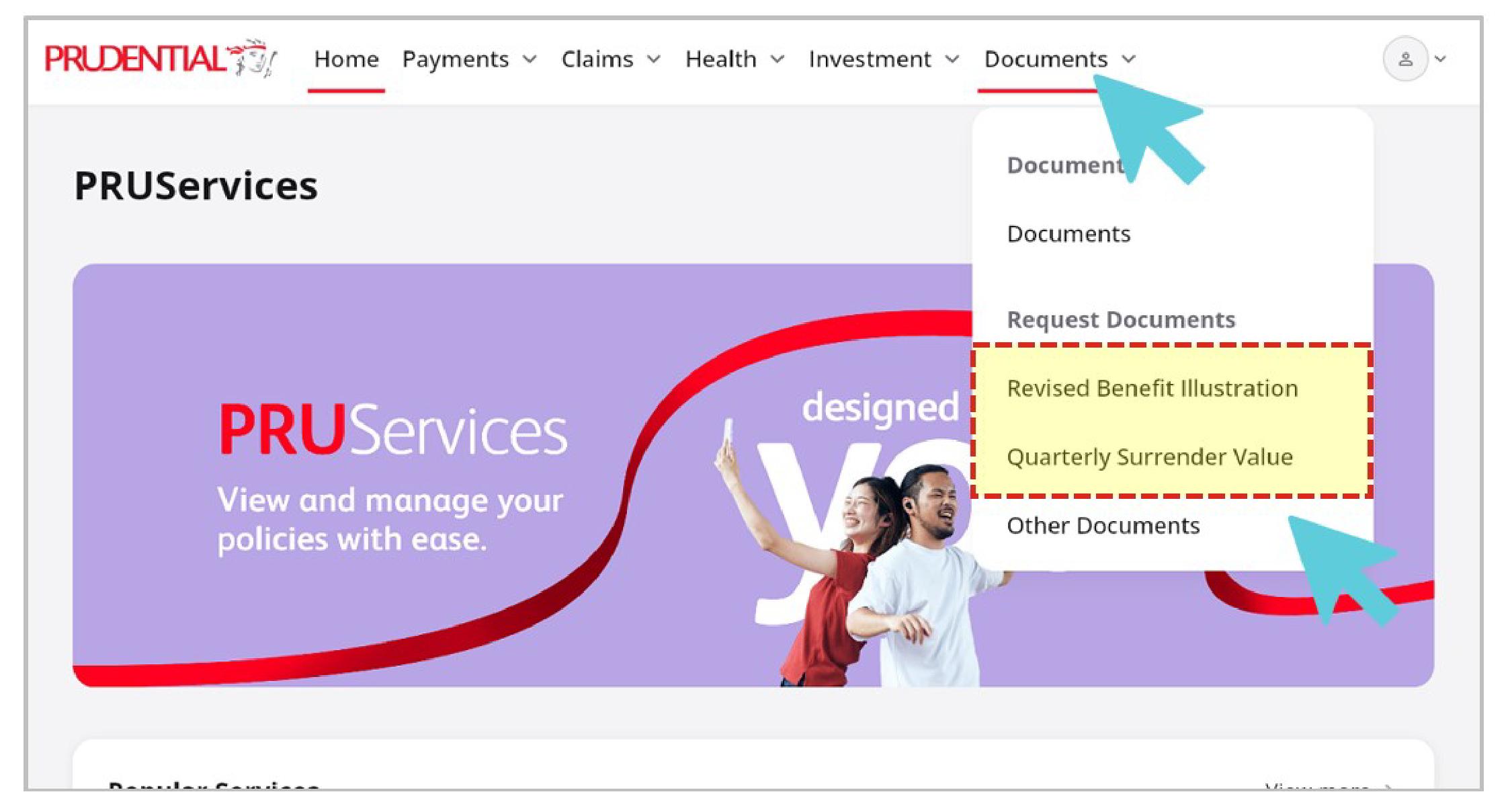
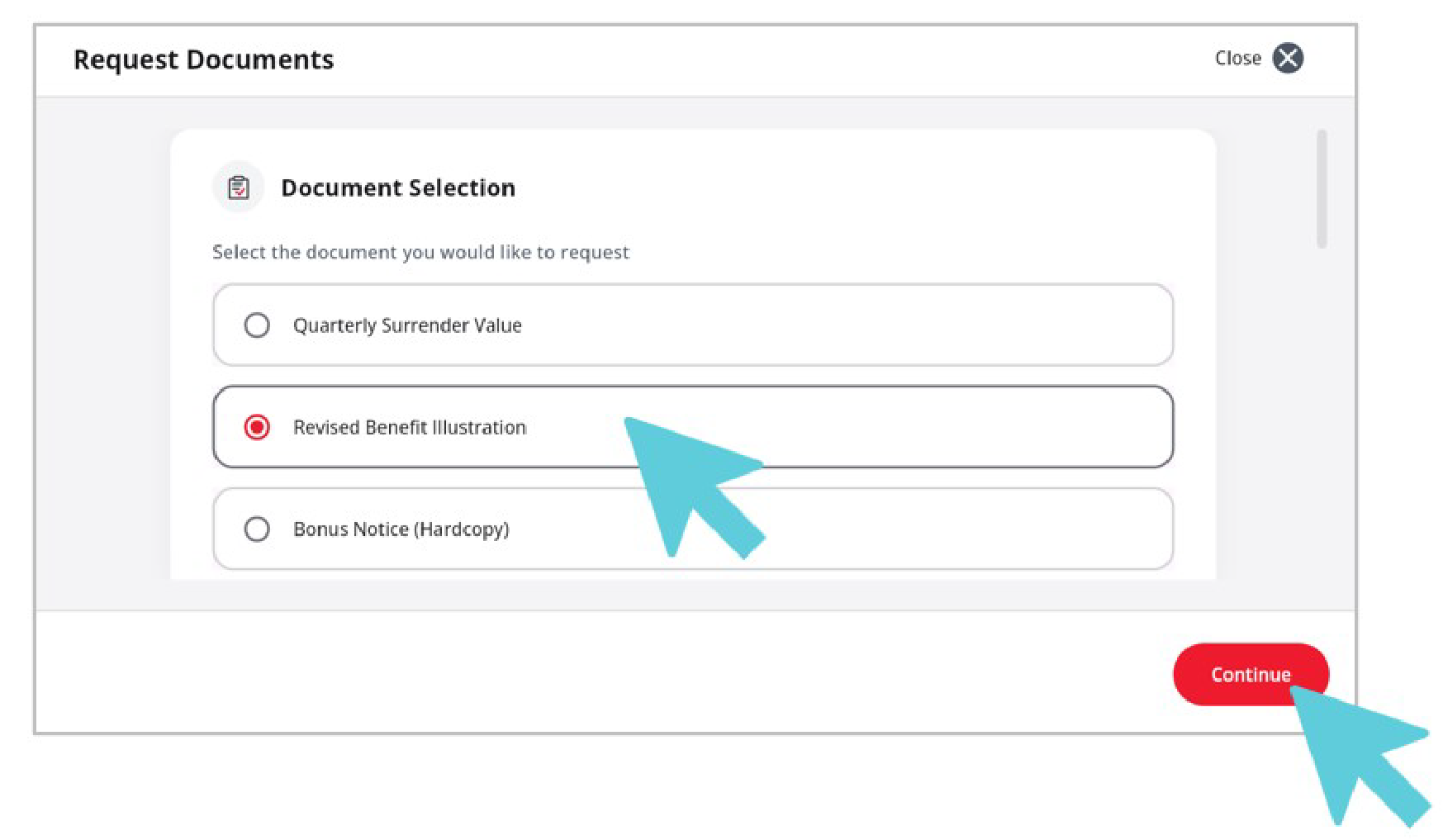
2. Select your document – Choose the document you wish to request. If required, scroll down to provide additional details, then click ‘Continue’.
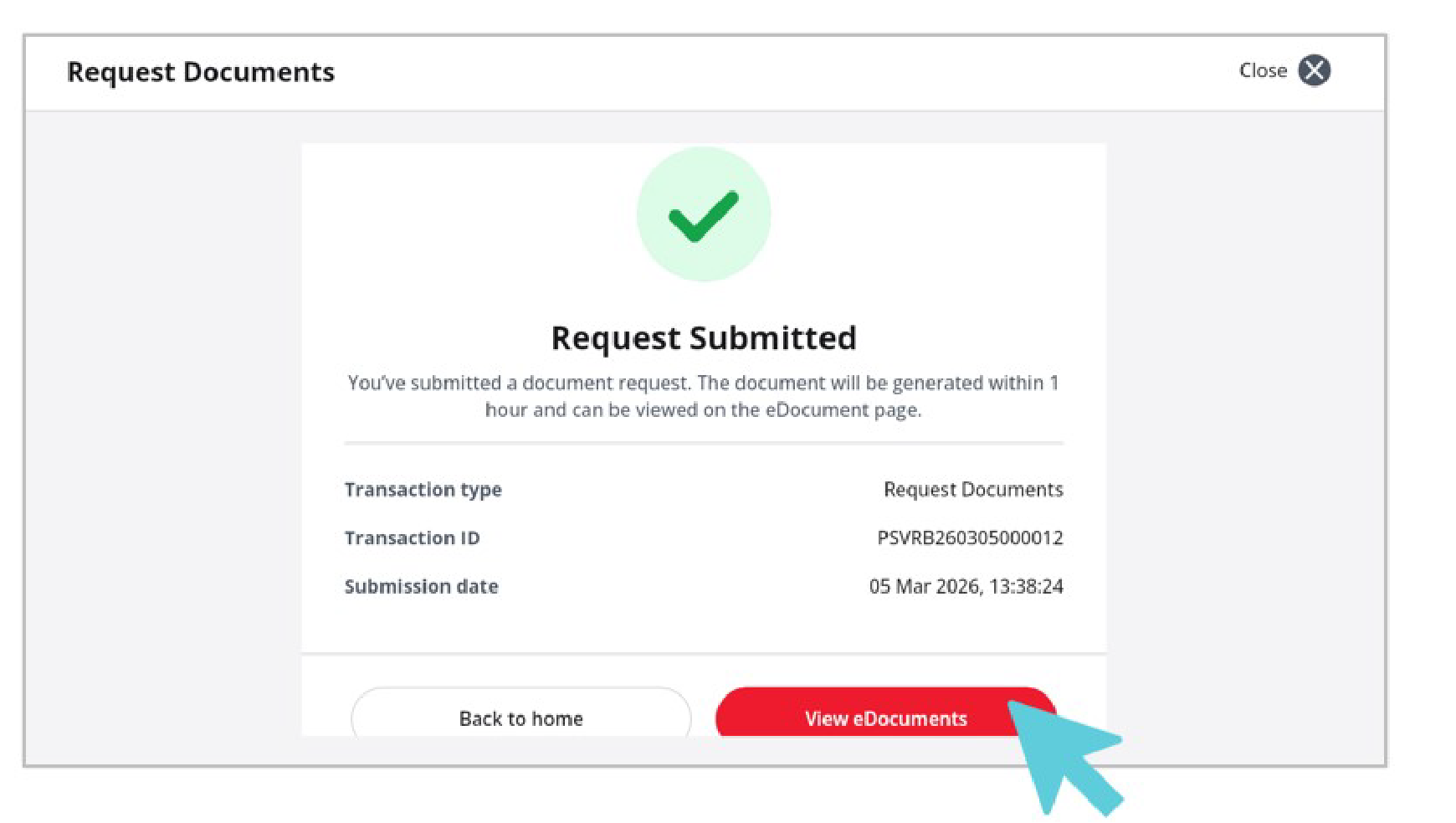
3. Submit your request – Your request will be submitted successfully. The document will be generated within 1 hour. Click ‘View eDocuments’ to access your document.
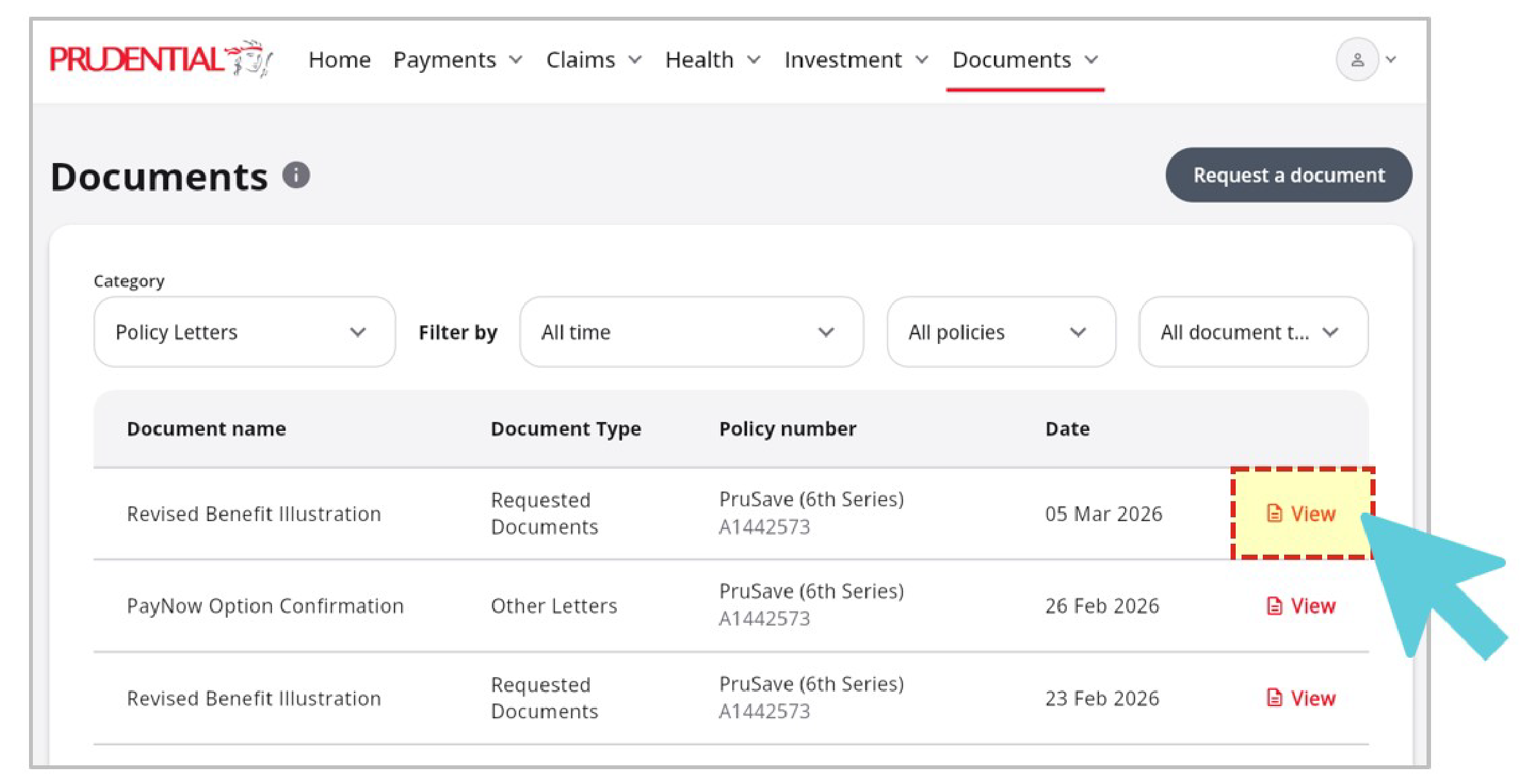
4. View your document – Once the document is ready, go to the eDocuments page and click ‘View’ to open your document.
For detailed FAQ, please click here.
Is nomination of beneficiary available on PRUServices?
Yes. You can view your existing beneficiary or trustee details under Policy Details on PRUServices.
To nominate a new beneficiary, follow these steps:
1. On the homepage, select your Policy → View more services → Policy Services → Nominate Beneficiary.
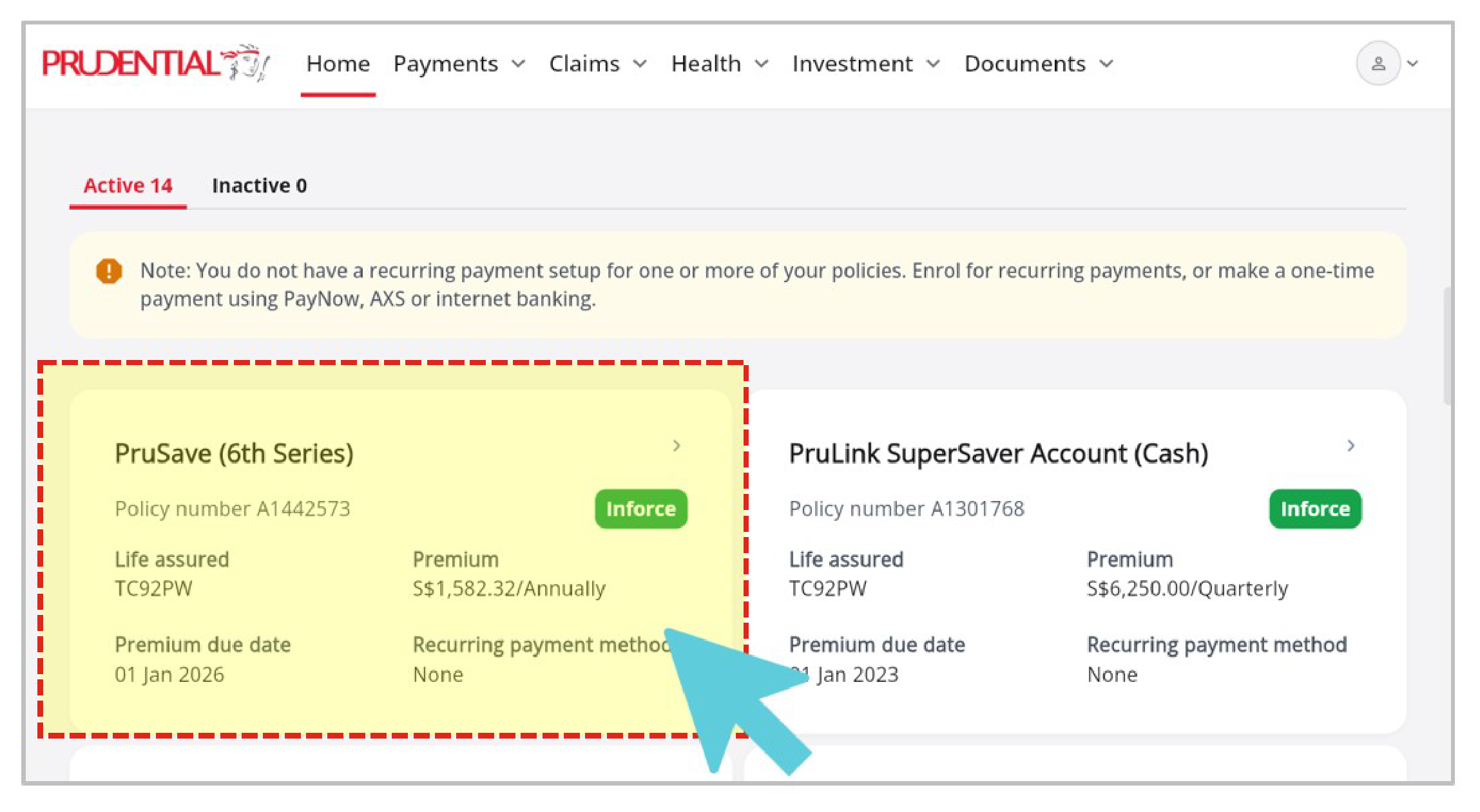
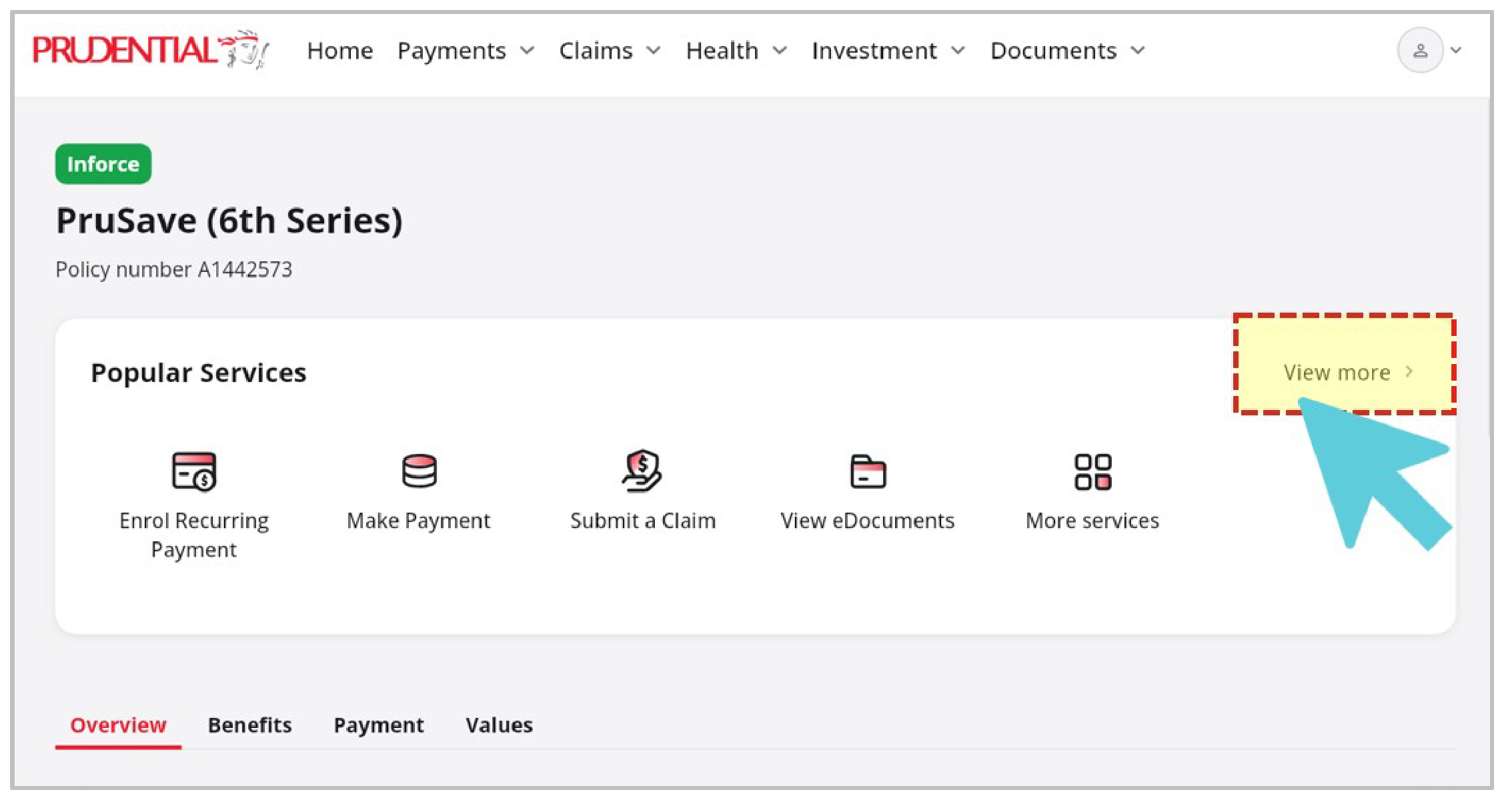
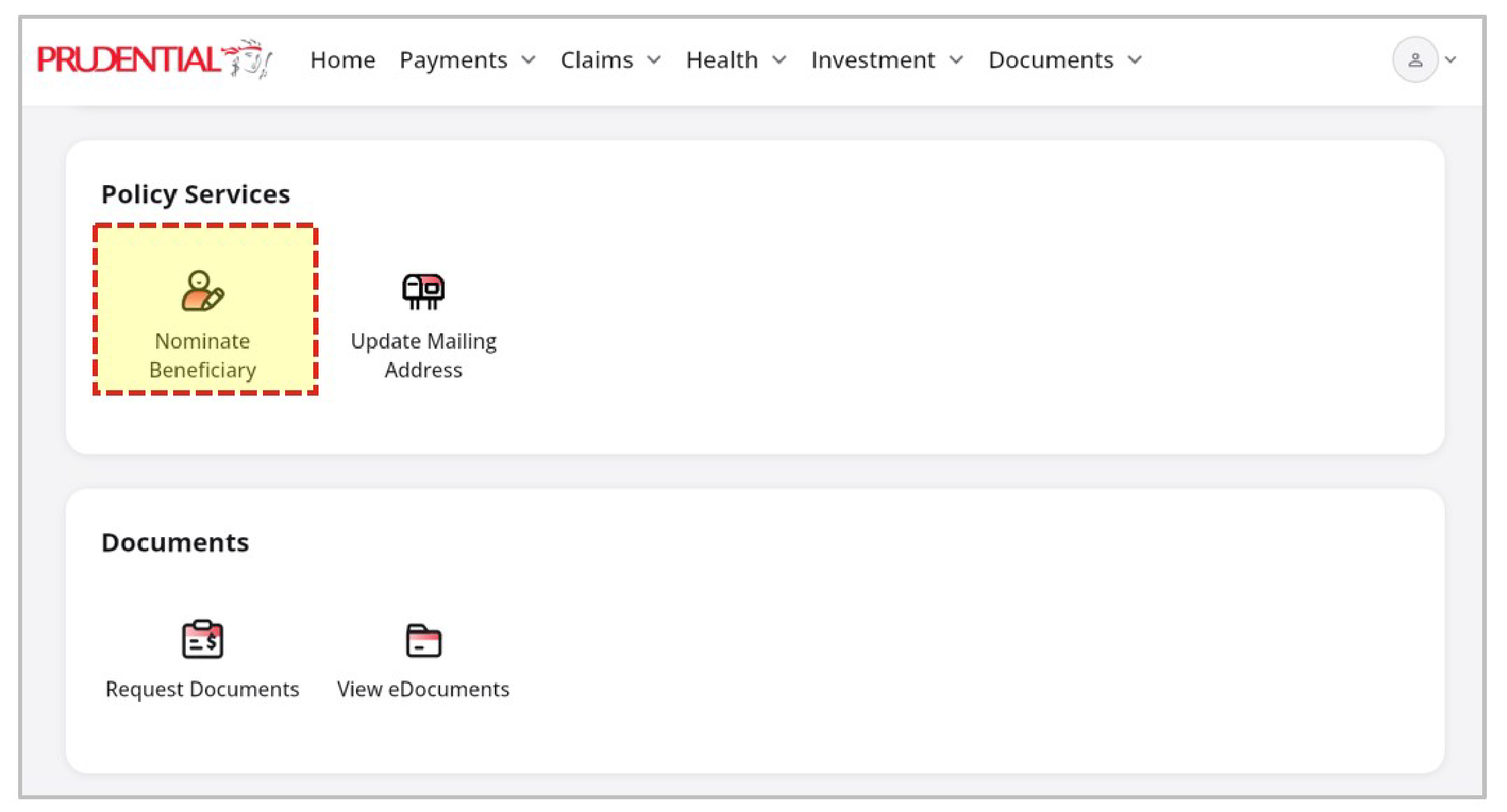
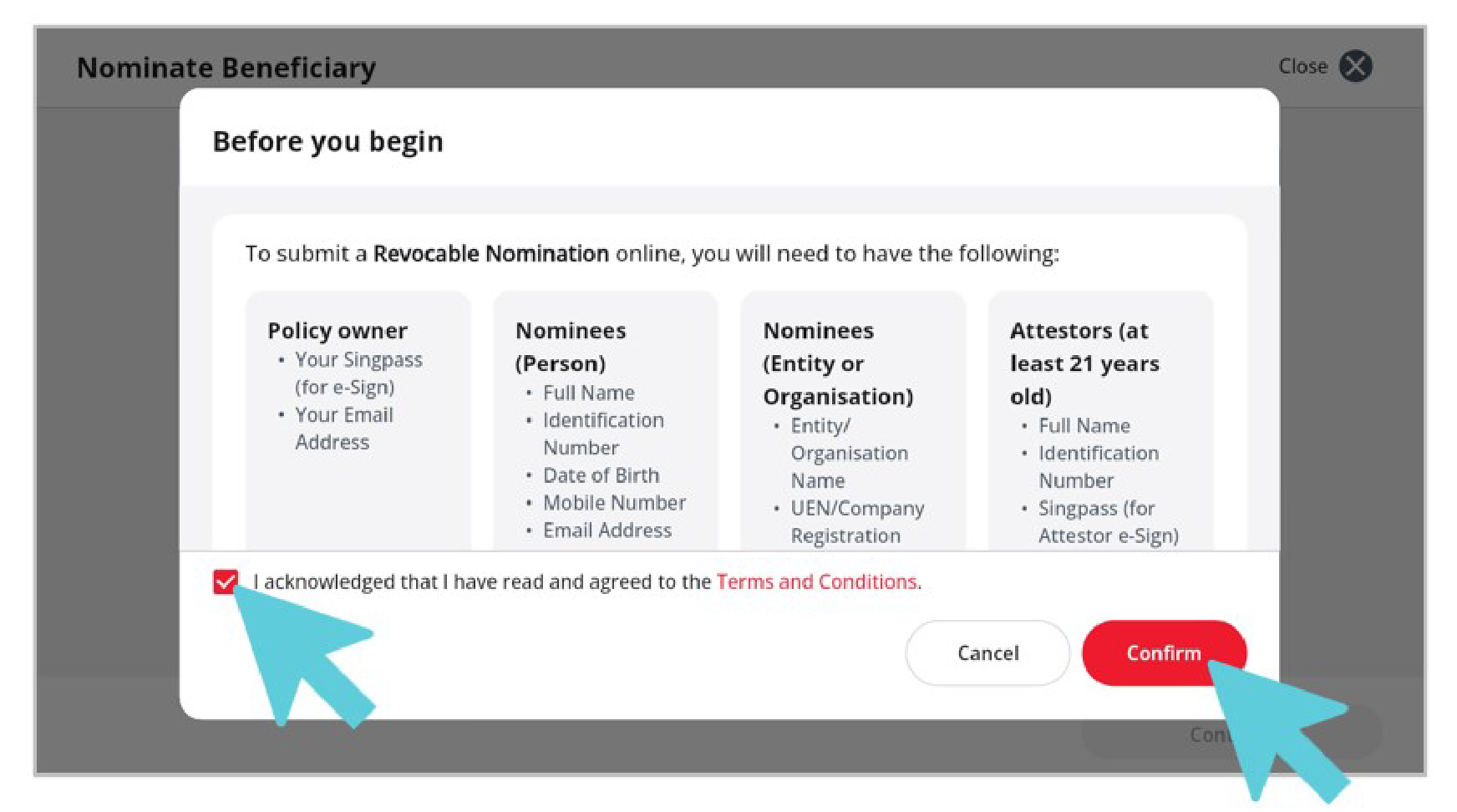
2. Read the advisory, tick the acknowledgement checkbox, and click Confirm.
3. Click ‘Add Nominee’.
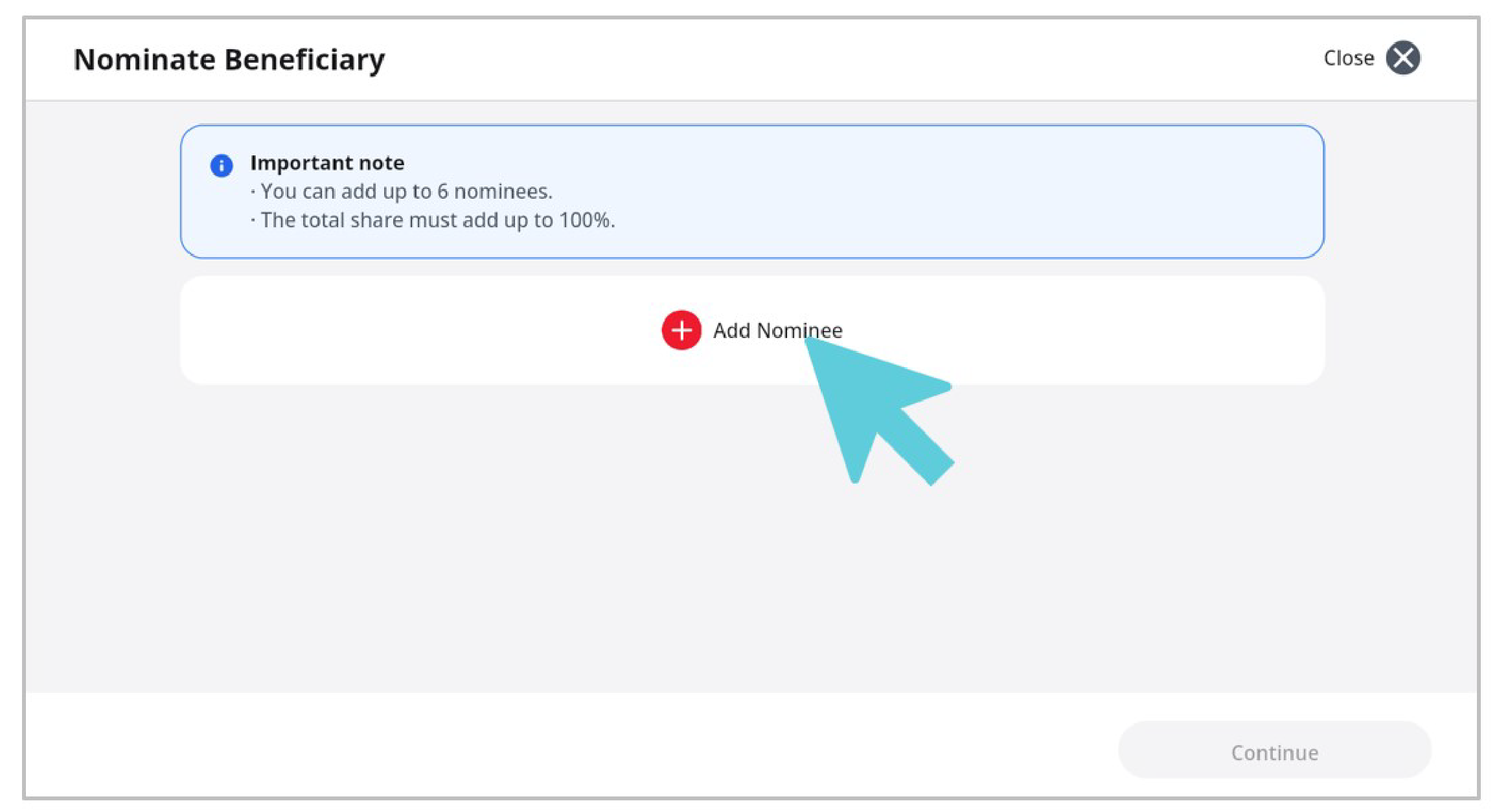
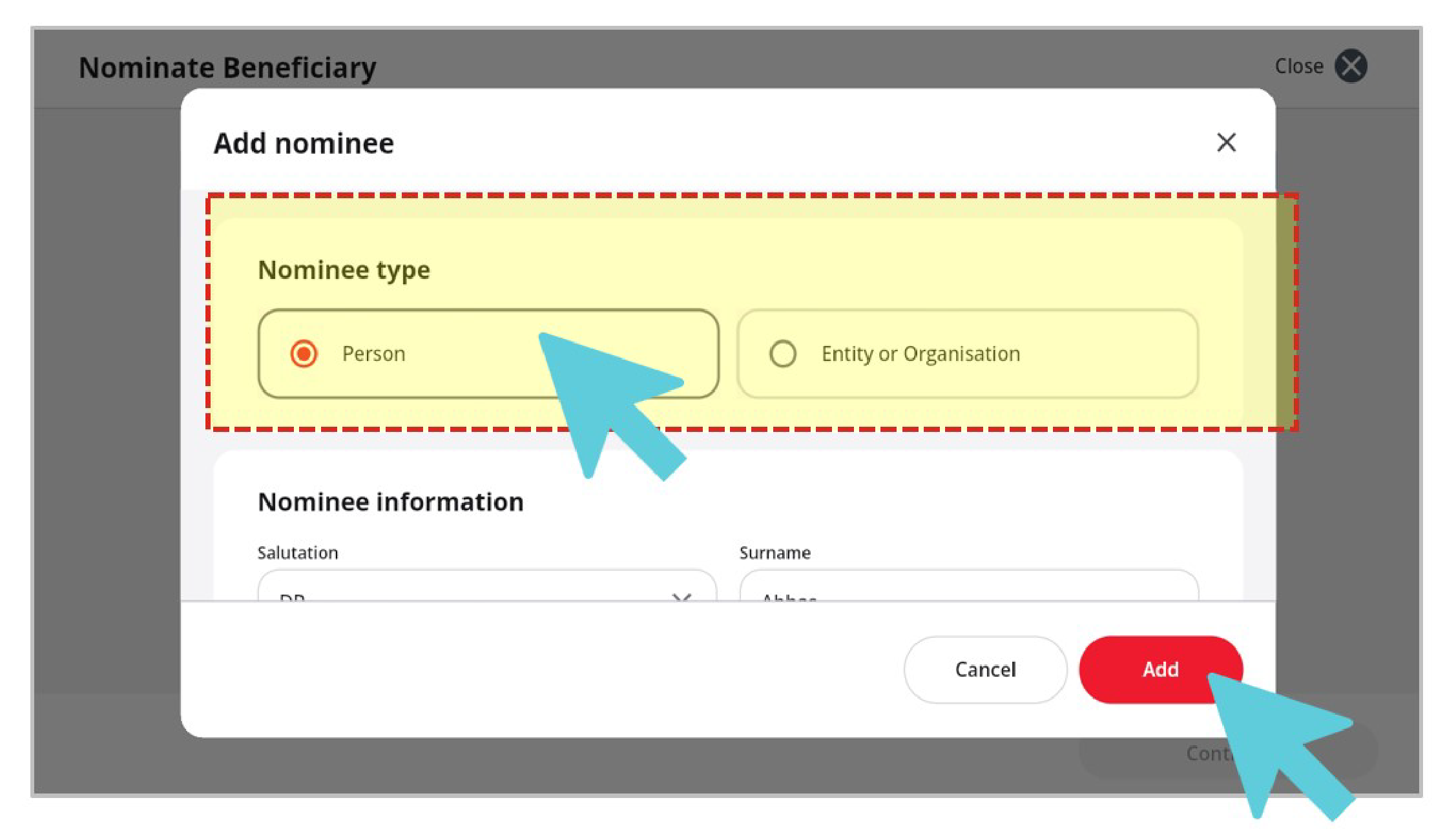
4. Select Nominee Type and complete the rest of the form. Click ‘Add’ when done.
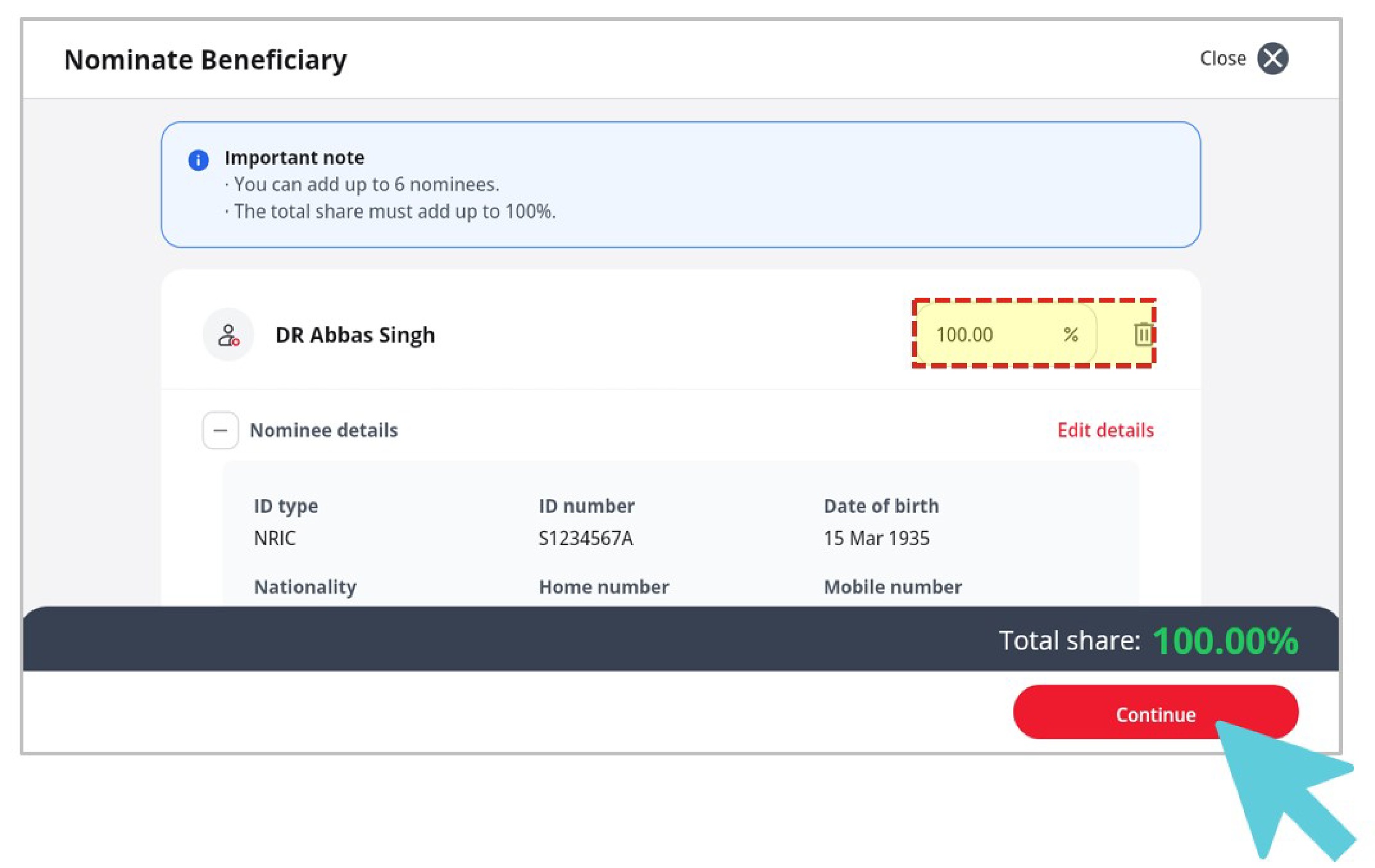
5. Enter the share percentage for each nominee. The total must add up to 100%, then click ‘Continue’.
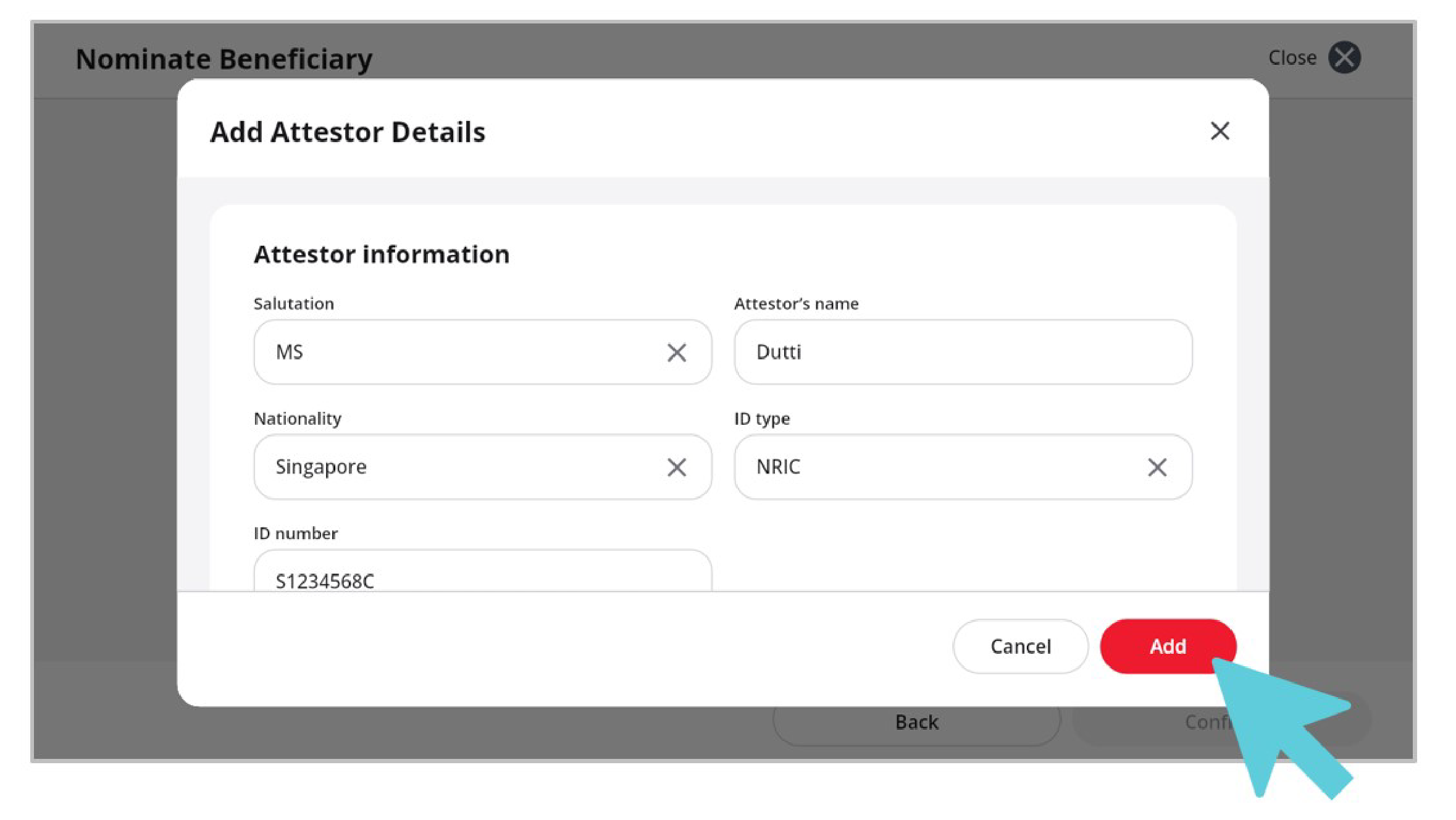
6. Nominate two individual attestors. Click Add details under each attestor.
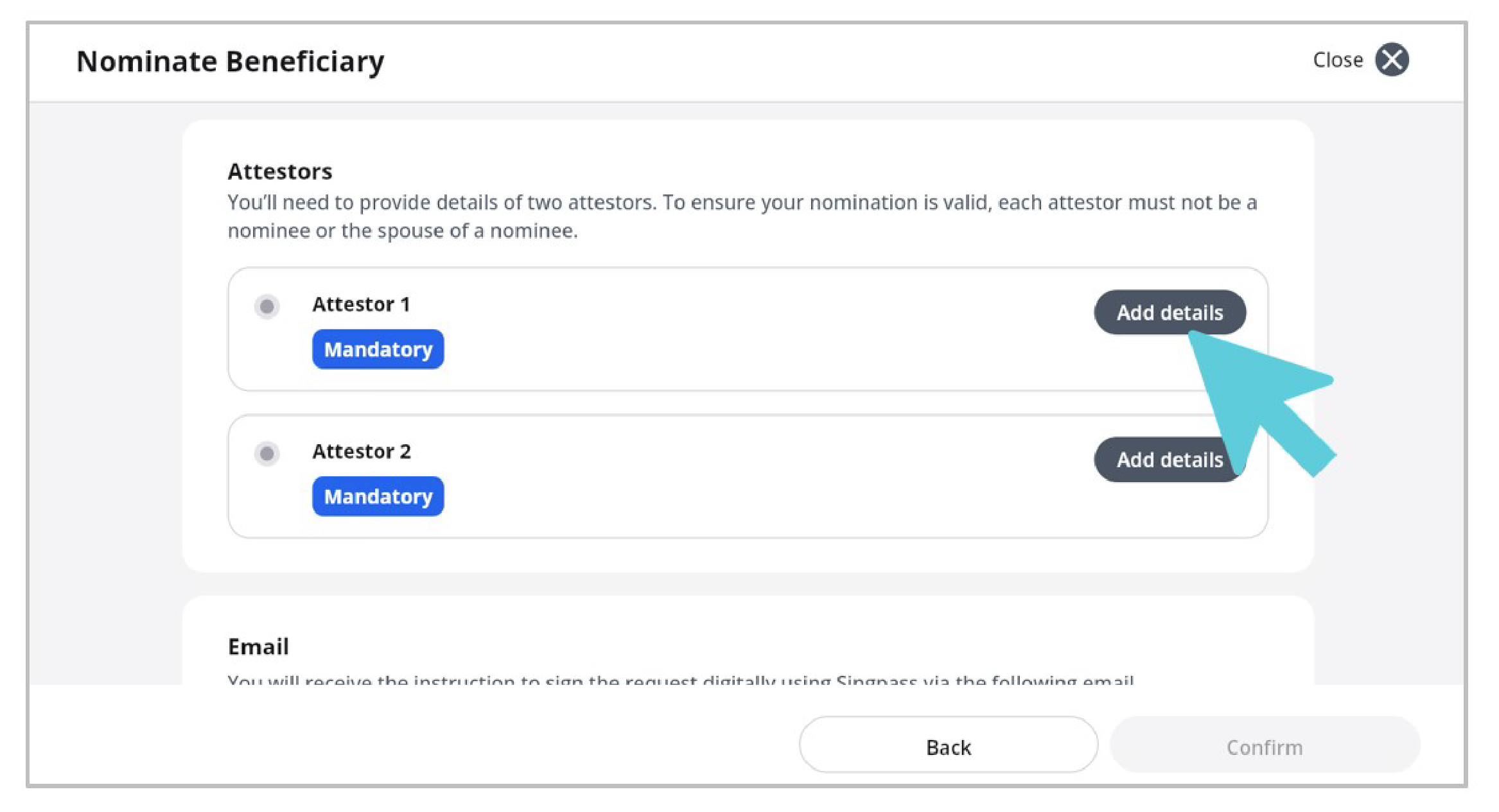
7. Complete their details and click Add.
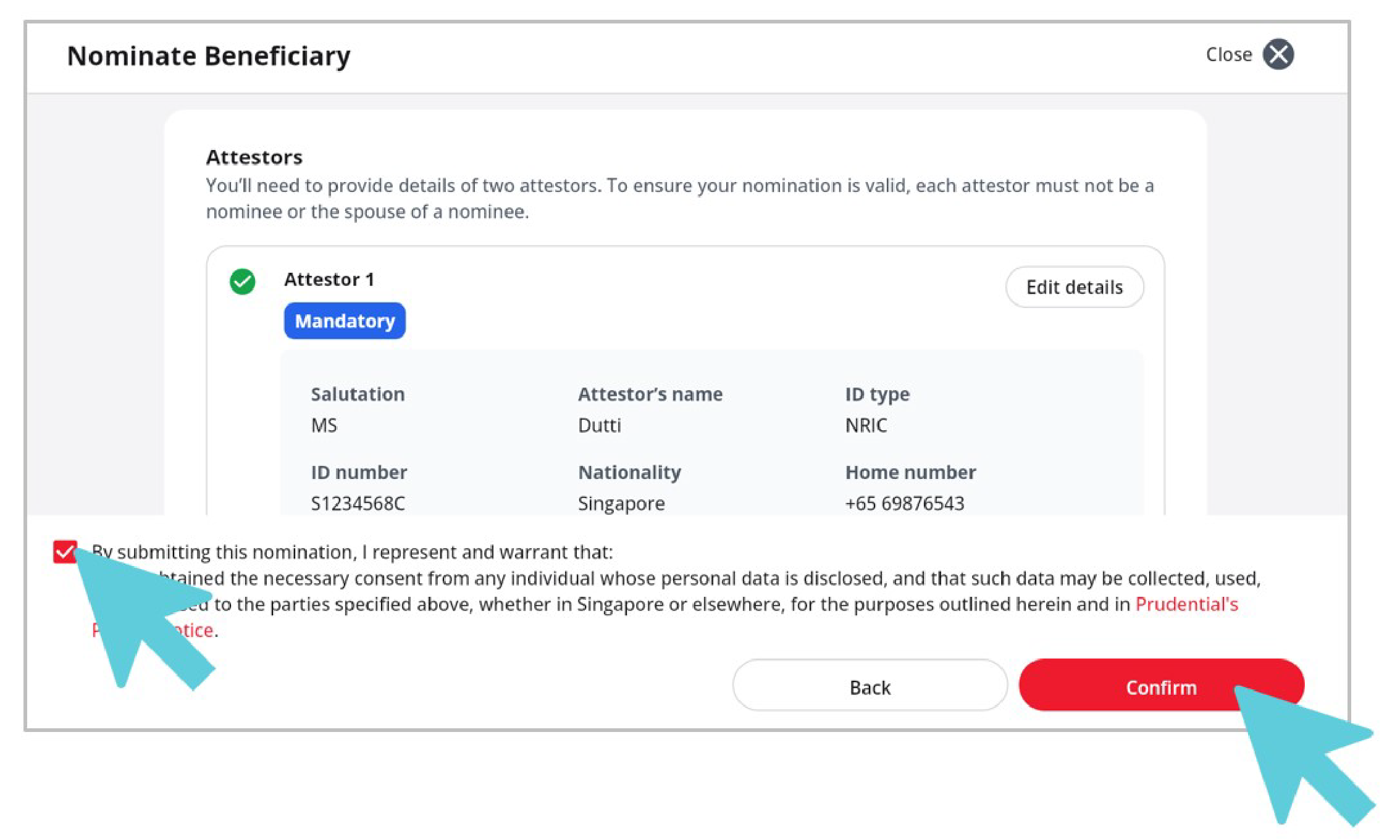
8. Verify your email address, tick the acknowledgement checkbox, and click Confirm.
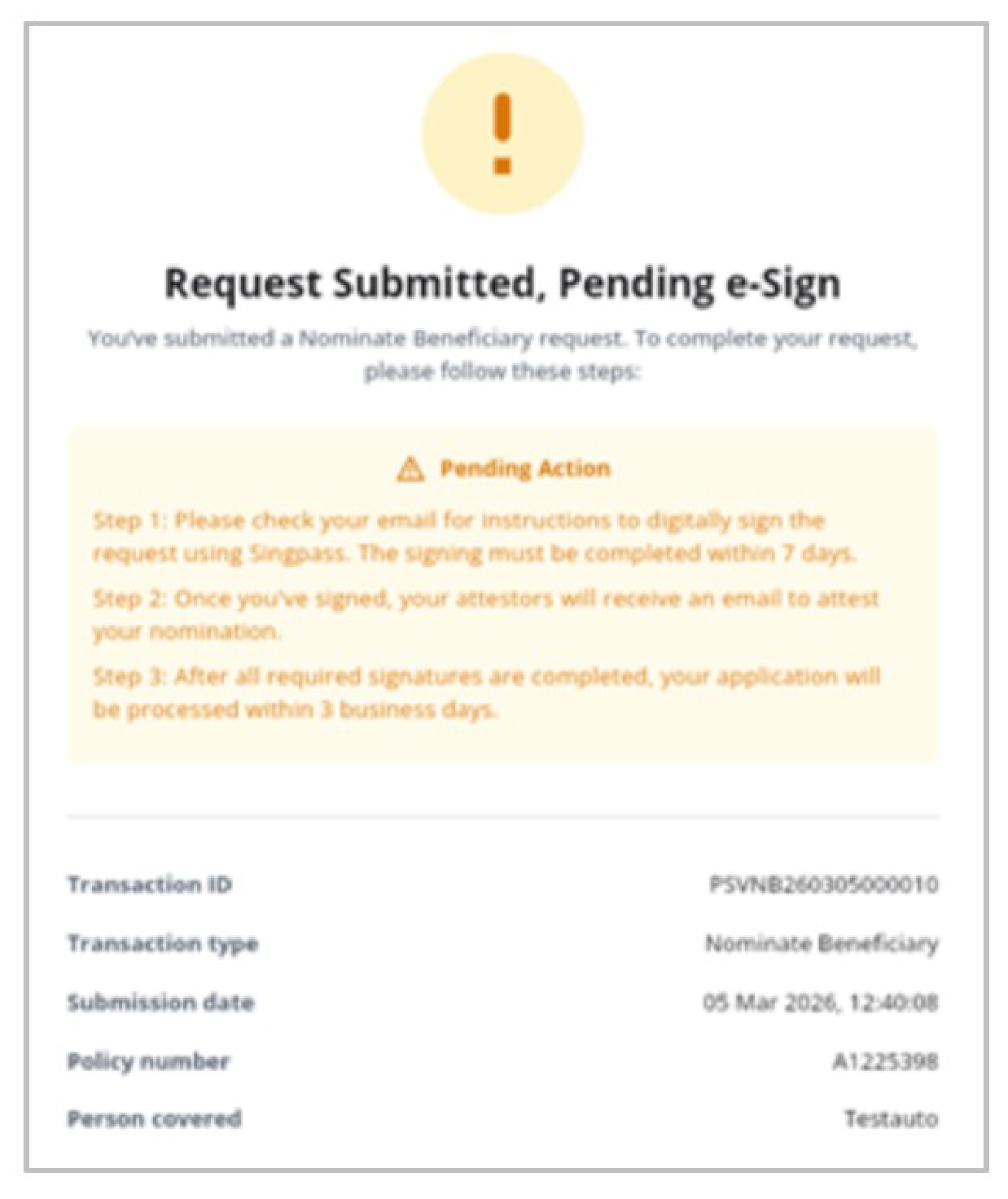
9. After successful submission, you will receive an email with instructions to complete digital signing via Singpass.
For detailed FAQ, please click here.
How can I complete an auto reinstatement for my policy on PRUServices?
Auto Reinstatement is available on PRUServices for eligible policies only.
To complete an auto reinstatement, follow these steps:
1. Select the inactive/ lapsed policy you wish to reinstate.
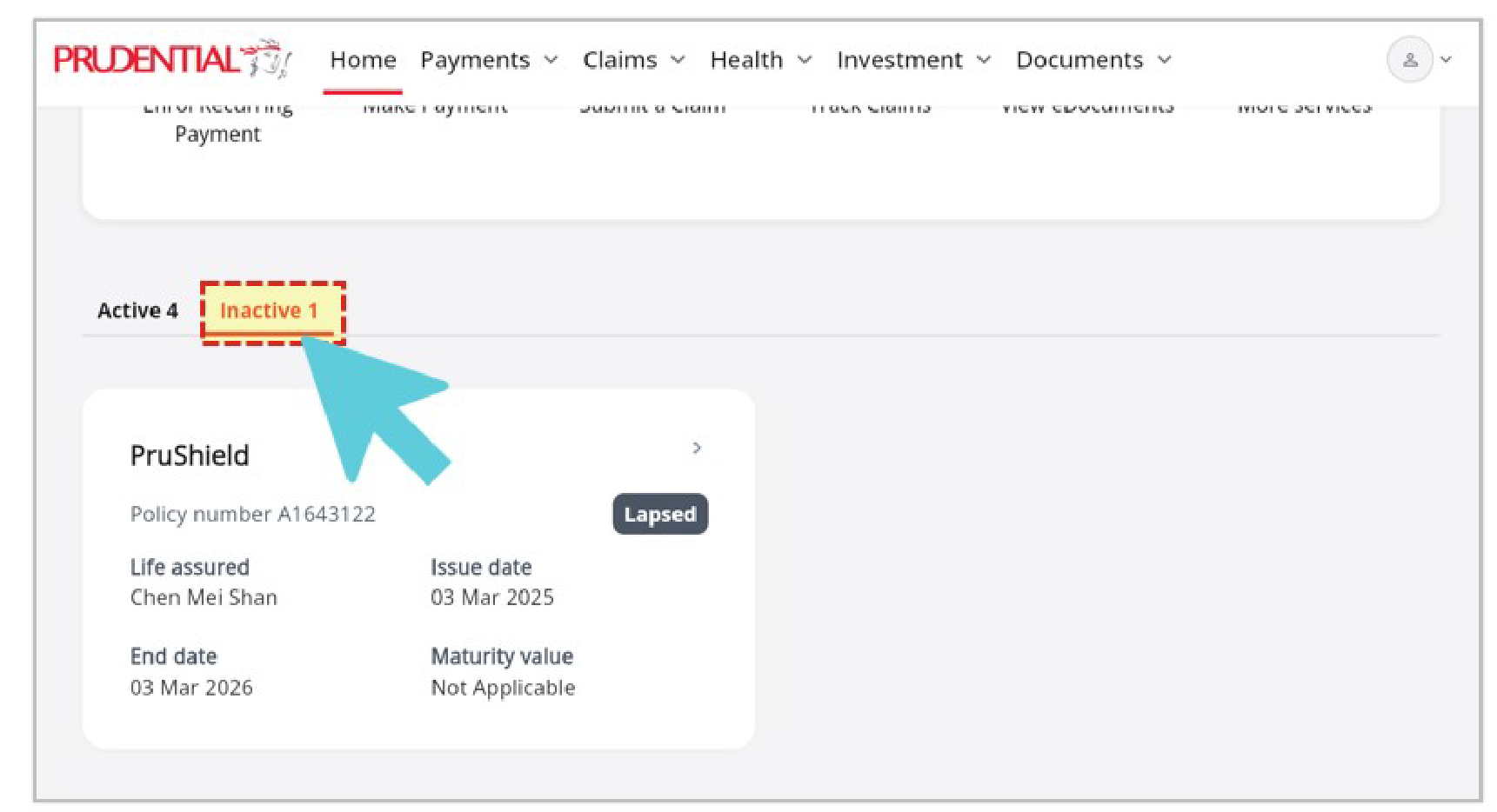
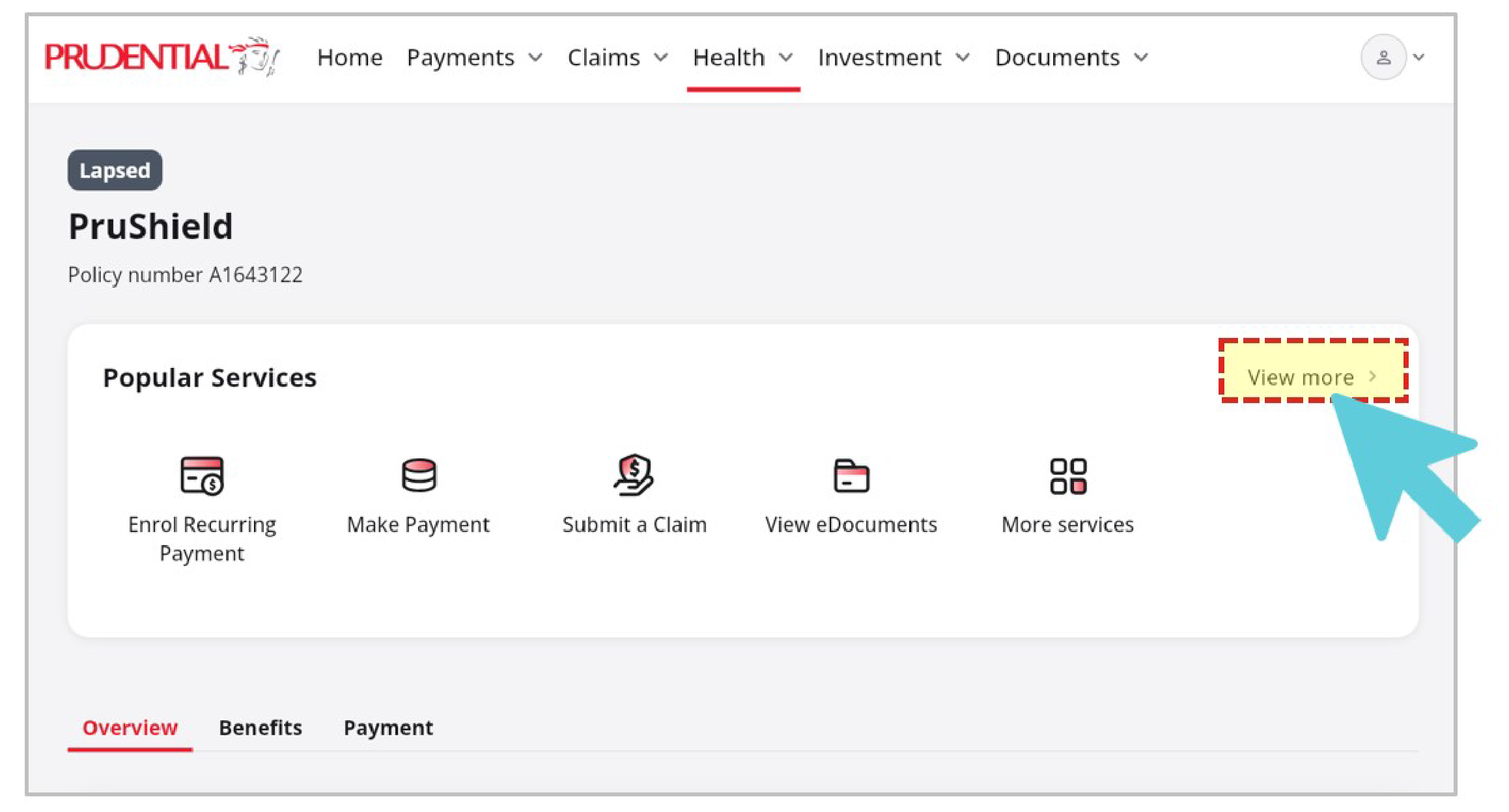
2. Click on ‘View more’ or ‘More services’ under Popular Services.
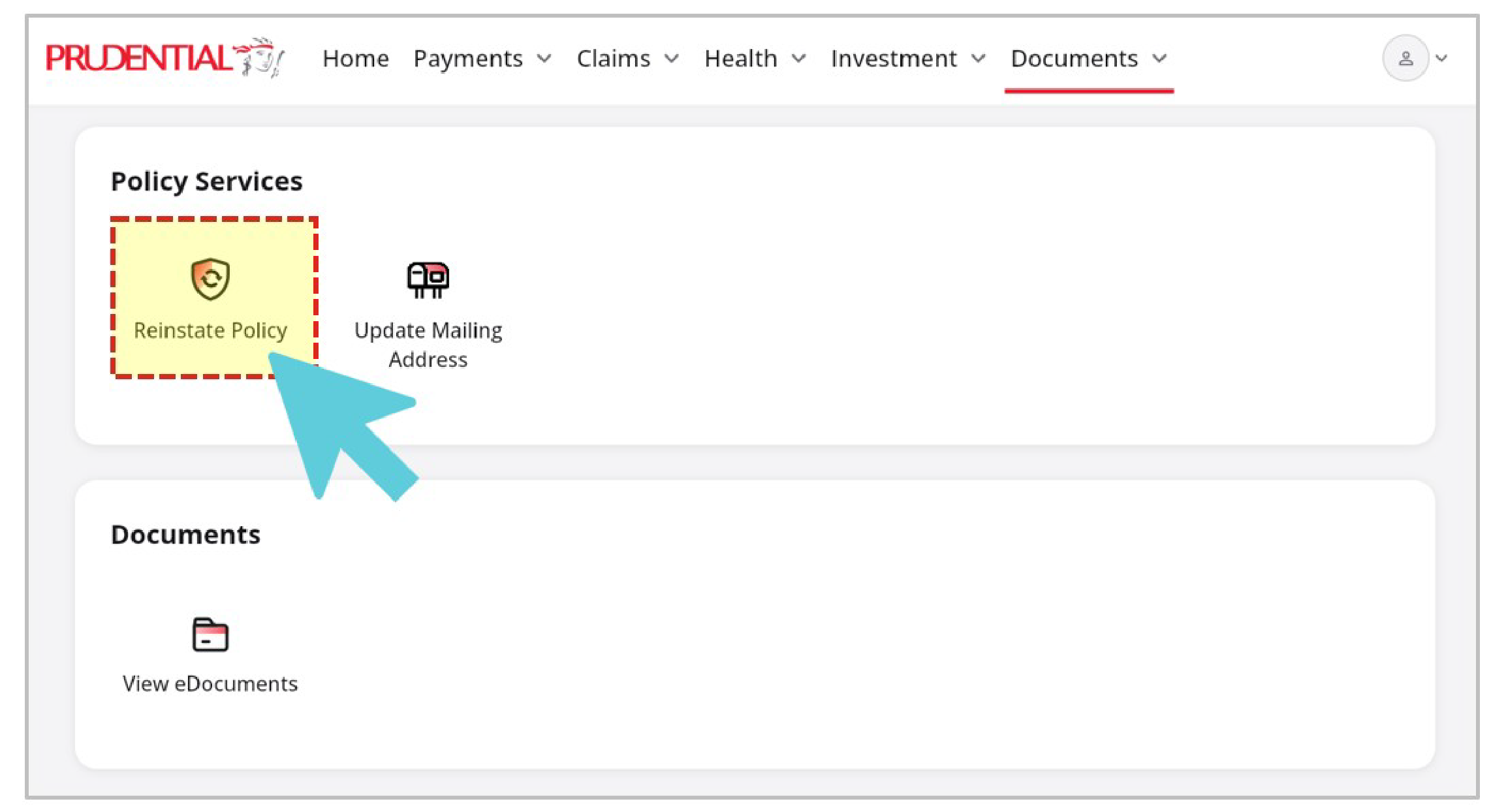
3. Scroll down to Policy Services and click on ‘Reinstate Policy’. If this icon is unavailable here, contact Financial Representative or Customer Service, as this policy may not be eligible for reinstatement, or may require a Manual Reinstatement.
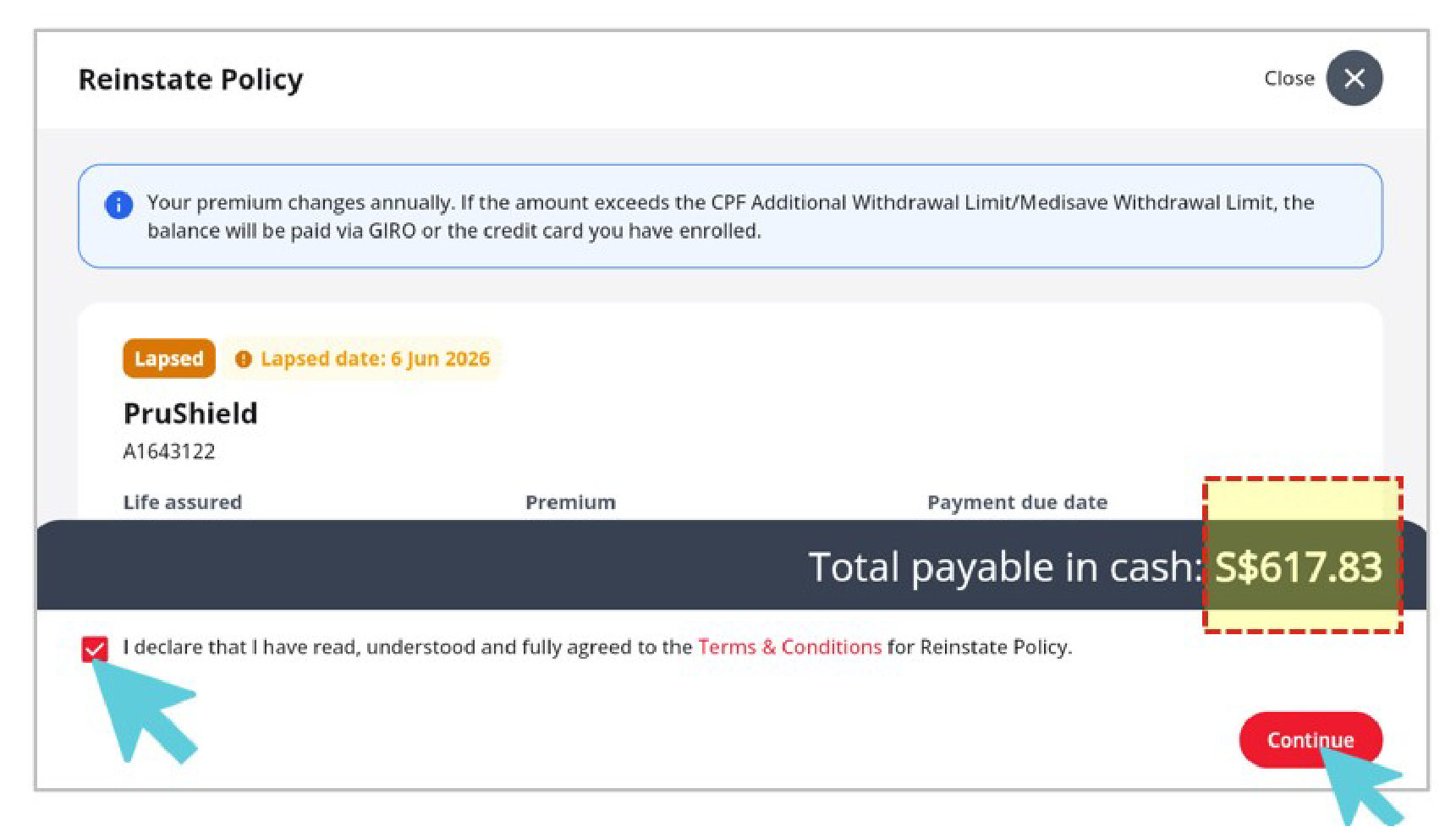
4. Follow the onscreen instruction to submit your reinstatement request.
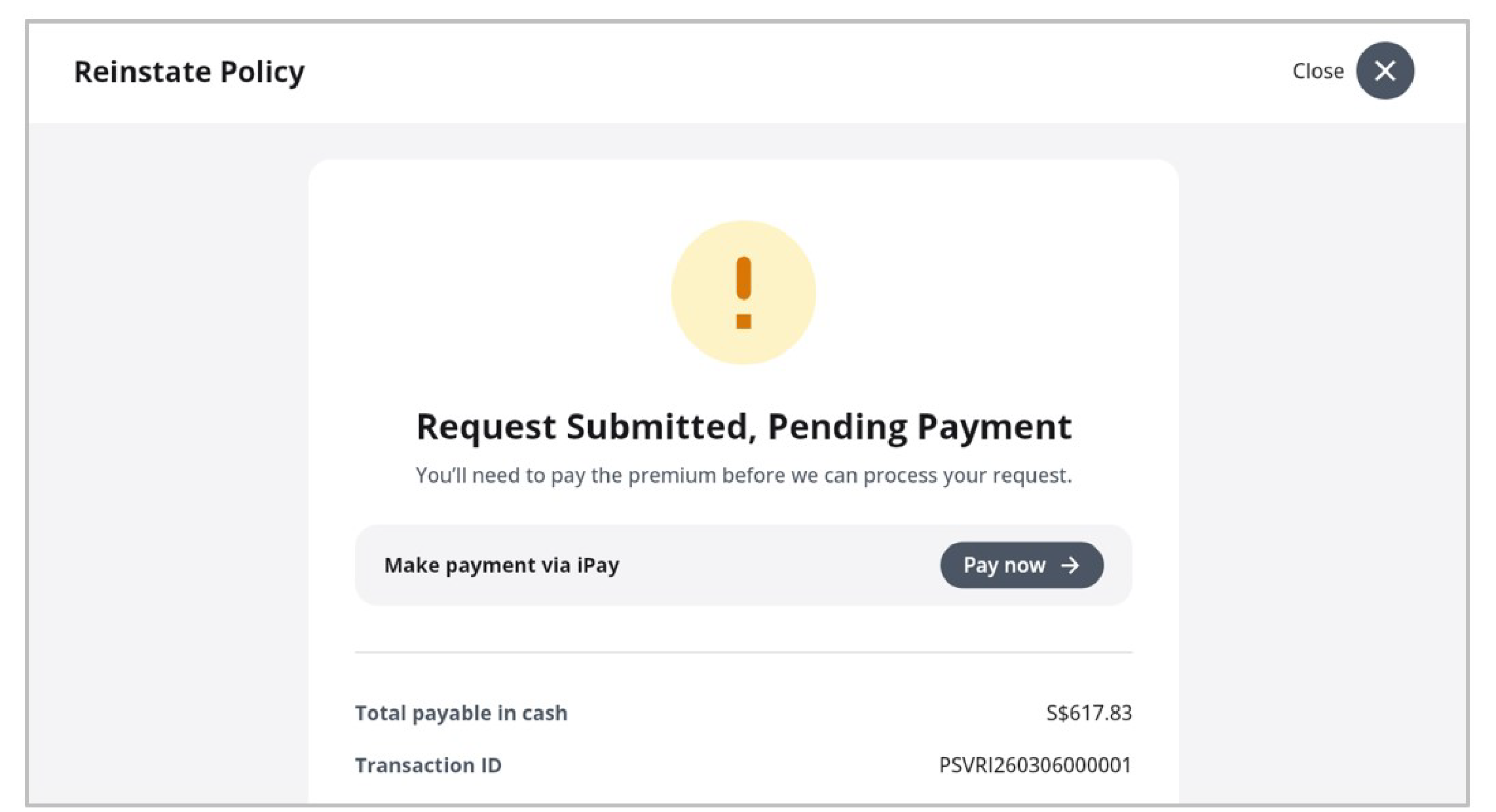
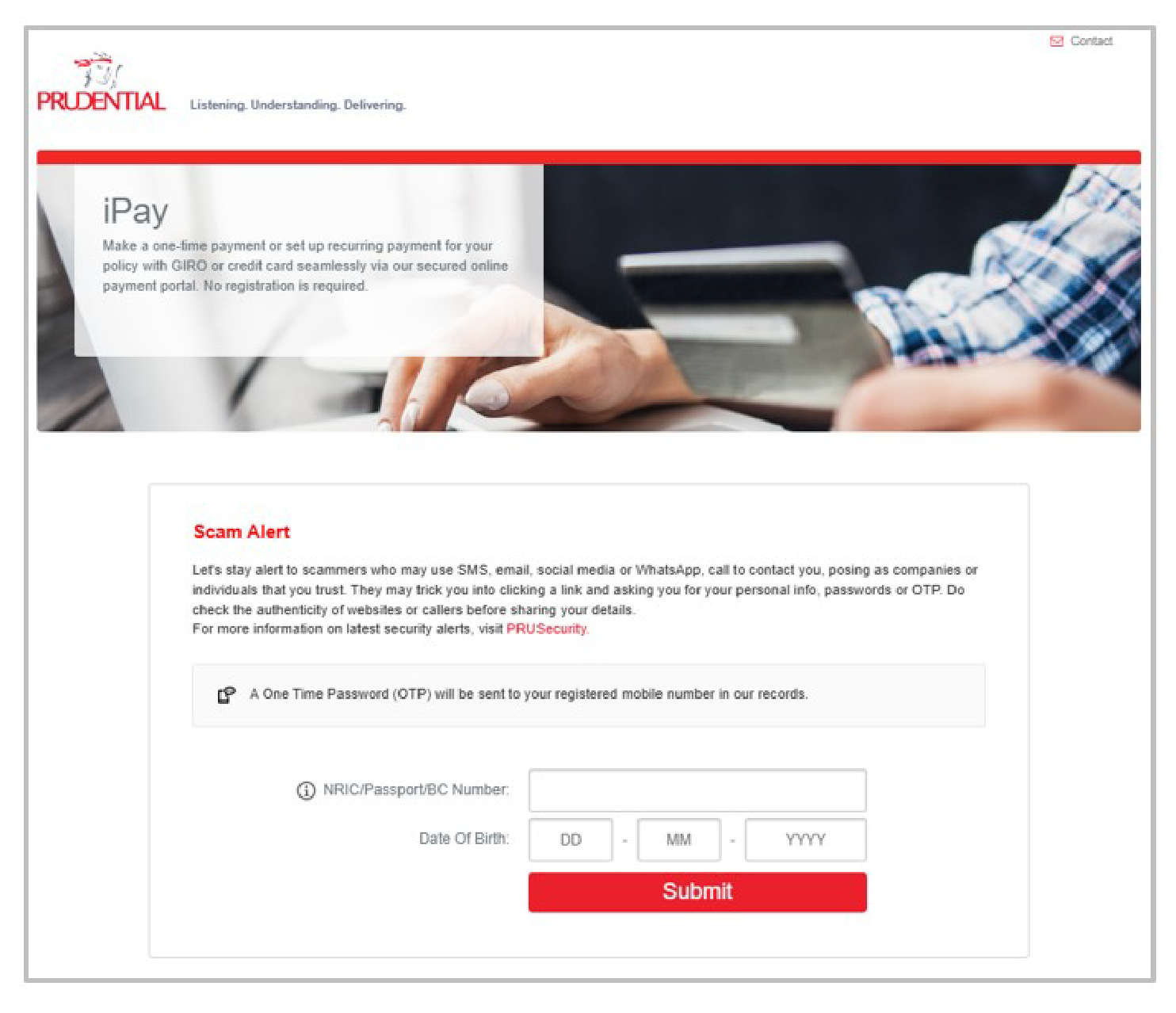
5. Once submitted, complete the payment (via iPay, if required).
For detailed FAQ, please click here.
Update of Personal Particulars
Mail-in / Customer Service Centre
You can also update your contact details by completing this form and mail it to us or by visiting our Customer Service Centre. You can update the following details:
- Mailing address
- Residential address
- Contact number (home, office)
- Email address
For other personal particulars, please complete this form and mail it to us or by visiting our Customer Service Centre. You can update the following details:
- Change of signature
- Update of name / citizenship / permanent residency status / passport number
Update Online
Now, you can update your personal particulars in the comfort of your home, through our digital channel.
|
What you can update |
Our digital channel |
Step to follow |
|
PRUServices |
|
Policy Payments
How can I pay my policy payments?
For PRUShield plans (insuring Singaporeans/Singapore permanent residents), you can pay the premiums using your CPF Medisave. For other regular premium plans, you can pay the premiums using any one of the options listed below:
- GIRO
- Credit Card
- PayNow (QR code)
- AXS
- Internet Banking (Bill Payment or FAST Transfer)
- Telegraphic Transfer
Please visit our How to Pay webpage for the guide on how you can pay your policy premiums using the options listed above.
How do I change the frequency of my premium payments?
- Log in to your PRUServices account
- Navigate to top menu bar and click on "Payment"
- Select “Change payment frequency”
- Select a new payment frequency. If advance premium is needed, follow the steps accordingly
- Click on "Continue" complete your transaction
All changes will take effect on your next policy anniversary date.
How do I change my credit card number for premium payment?
1. iPay
- Log in to iPay with your NRIC and Date of Birth
- Select Credit Card Enrolment
- Select your desired Policy Number(s)
- Click “Next”
- Click to agree and acknowledge the important notes and terms and conditions, then click “Next”
- iPay will redirect you to the credit card payment page. Please proceed to enter your billing information and credit card details
- Click “Submit”
- Authorise the transaction to complete the enrolment
2. PRUServices
- Login to your PRUServices account
- From the top navigation bar, click on "Payments"
- Select “Enrol recurring payment”
- The iPay portal will launch in a new tab
- Follow the steps outlined in section 1 "iPay" to complete your transaction
How do I change my GIRO account number for premium payment?
1. iPay
- Log in to iPay with your NRIC and Date of Birth
- Select Giro Enrolment (applicable to participating eGIRO bank accounts*)
- Select your desired Policy Number(s)
- Click “Next”
- Click to agree and acknowledge the important notes and terms and conditions, then click “Next”
- Select the bank that you wish to use for enrolment. iPay will redirect you to the i-banking website. Please proceed to log in with your banking User ID and password
- Enter the OTP or login authentication pop-out notification sent from your bank to complete the transaction
The GIRO instruction will be activated within 1 working day.
*DBS/POSB, Bank of China, Citibank, HSBC, ICBC, Maribank, Maybank, OCBC, Standard Chartered Bank and UOB
2. PRUServices
- Login to your PRUServices account
- From the top navigation bar, click on "Payments"
- Select “Enrol recurring payment”
- The iPay portal will launch in a new tab
- Follow the steps outlined in section 1 "iPay" to complete your transaction
The GIRO instruction will be activated within 1 working day.
3. DBS/POSB iBanking website
- Login to your DBS iBanking account
- Add a new GIRO arrangement
- Select Prudential Assurance as the billing organisation
- Input the Policy Number as the billing reference number
The GIRO instruction will be activated within 5 working days.
How do I request Prudential to make another deduction/charge from my GIRO account/credit card?
For premium payment by credit card, we will charge the outstanding premium from your credit card again 15 calendar days after the first unsuccessful attempt.
For premium payment by GIRO, please refer to the table below for the deduction dates:
| Bank | Premium Due Dates | Scheduled Deduction Dates | |
| 1st attempt | 2nd attempt (if the 1st attempt is unsuccessful) |
||
| POSB / DBS GIRO | 06th of current month to 21st of current month |
21st (of current month) |
05th (of following month) |
22nd of current month to 05th of following month |
05th (of following month) |
21st (of following month) |
|
| Interbank GIRO (all other banks) |
2nd of current month to 23rd of current month |
23st (of current month) |
1st (of following month) |
24th of current month to 1st of following month |
1st (of following month) |
23th (of following month) |
|
The scheduled deduction dates are fixed with the banks and cannot be changed. However, if a scheduled deduction date falls on a Saturday, Sunday or Public Holiday, deduction will take place on the next working day.
How do I cancel a GIRO arrangement?
To cancel existing GIRO arrangement:
- Inform your bank on the cancellation request.
- To change the existing GIRO arrangement to other payment methods, please complete Section A of the Application for Alteration (Form 1). Do note that ‘other payment methods’ is not applicable to policies on monthly frequency. If you would also like to change your payment frequency, please submit the Change of Payment Frequency Form.
Can I change the GIRO deduction/credit card billing date(s) for my policy(ies)?
No, this option is not available.
We will charge the premium to your credit card on the premium due date. The charge will take place on the next working day if the premium due date falls on a Saturday, Sunday or Public Holiday.
Please refer to the table below for the GIRO deduction schedule:
| Bank | Premium Due Dates | Scheduled Deduction Dates | |
| 1st attempt | 2nd attempt (if the 1st attempt is unsuccessful) |
||
| POSB / DBS GIRO | 06th of current month to 21st of current month |
21st (of current month) |
05th (of following month) |
22nd of current month to 05th of following month |
05th (of following month) |
21st (of following month) |
|
| Interbank GIRO (all other banks) |
2nd of current month to 23rd of current month |
23st (of current month) |
1st (of following month) |
24th of current month to 1st of following month |
1st (of following month) |
23th (of following month) |
|
The scheduled deduction dates are fixed with the banks and cannot be changed. However, if a scheduled deduction date falls on a Saturday, Sunday or Public Holiday, deduction will take place on the next working day.
Why was the GIRO deduction/credit card billing for my policy premium unsuccessful?
Please check with your bank or credit card issuing company on this matter.
What do I do if my account does not have sufficient funds when the GIRO payment is made?
We will inform you that your GIRO deduction has been unsuccessful and the next GIRO deduction date.
Note: Some banks may charge a $10 service fee for the cost of processing each unsuccessful GIRO deduction due to insufficient funds. Please check with your bank to obtain more information on their fees/charges.
What is an Automatic Premium Loan (APL)?
The APL is a provision in your regular premium participating policy that will be automatically activated in the event when the premium due is not received within 30 days from the premium due date (“grace period”). The surrender value (if available) for your policy will be applied to pay the outstanding premiums. The surrender value used becomes a loan on your policy.
An interest is chargeable on the outstanding APL amount starting from the date of the loan. On each anniversary of the premium due date of your policy, we add the previous year's interest to the loan amount and charge interest on the total until the APL is fully repaid.
Presently, the APL interest rate of 5.75% per annum. We reserve the right to vary the interest rate and will notify you 3 months before the change.
The loan amount and interest will remain as outstanding amounts owing to us. You can repay the loan at any time, but we will deduct the loan amount and interest owning to us from any payment we make under your policy. If the total amount owing to us under your policy exceeds the surrender value, your policy terminates immediately.
The advantage of the APL provision is that your policy will remain in-force and you will remain covered for all benefits of the policy as long as there is sufficient surrender value.
How do I make repayments for Policy Loan(s)/Automatic Premium Loan(s)
The minimum amount for each repayment is $100. Loan repayments using credit card is not allowed.
Please visit our How to Pay webpage for the guide on how you can repay the loan(s) using the various payment options available.
Policy Coverage
How do I add a supplementary benefit/ rider?
To add a supplementary benefit, you will need to speak with your Financial Representative. You may check your Financial Representative's details by logging into PRUServices. If you would like us to arrange for another Financial Representative to contact you, please click here.
How do I cancel a supplementary benefit/ rider?
Please complete and send us the Application for Alteration (Form 2).
How do I reinstate my lapsed policy?
If your policy has lapsed for less than 60 calendar days (90 calendar days for PRUShield and PRUExtra), please send us your payment of the outstanding premiums due.
If your policy has lapsed more than 60 calendar days (90 calendar days for PRUShield and PRUExtra), please complete and send us the Application for Reinstatement Form together with your payment of the outstanding premiums due. We will review your declarations in the form and inform you if we require further information from you to review your reinstatement application. Please note that all costs of obtaining the additional information will be borne by you.
Please refer to the terms and conditions of your policy for the reinstatement application period applicable for your policy.
How do I contact the 24-Hour worldwide emergency helpline?
24-Hour Hotline: (65) 6950 9287
If you have an active policy with travel and medical assistance benefits, you may call this helpline when travelling abroad and in need of emergency help due to an accident.
Note:
- Please have your policy number ready when you make the call.
- Services provided are subject to the Terms and Conditions in your policy document.
Making Withdrawals
How do I do a partial withdrawal for my PRULink policy?
Please refer to the terms and conditions of your policy to check if your policy has this feature.
Complete and send us the Application for Partial Withdrawal Form.
How do I make a Cash Benefit withdrawal?
Please refer to the terms and conditions of your policy to check if your policy has this feature.
For Cash Benefit withdrawals,
Login into PRUServices to perform Cash Benefit Withdrawal.
Step 1: Select the policy number
Step 2: Select the 'Select E-Transaction for this policy' button
Step 3: Select 'Cash Benefit Withdrawal' button to enter the amount that you would like to withdraw
OR
Option 2: Complete and send us the Application for Cash Bonus / Cash Benefit Withdrawal / PruAsset Withdrawal Form.
For Cash Bonus withdrawals, please complete and send us the Application for Cash Bonus / Cash Benefit Withdrawal / PruAsset Withdrawal Form.
Deferred Cash Benefit Payout Option
If you have opted for the deferred cash benefit payout option in your proposal form, the deferred payout option will only be paid out to you on the scheduled due date if you meet all of the following criteria:
- No cash benefit withdrawal has been made from your policy.
- Cash benefit has not been used as a premium for your policy, and
- Your premiums are paid up to the cash benefit due date.
If you do not meet the criteria for receiving the deferred yearly cash benefit payout, the cash benefit will remain accumulated in your policy. You have the option to receive yearly cash benefit on the cash benefit due date by submitting Alteration Form 1. You can find the form here.
You may also withdraw your accumulated cash benefit amount by following the steps in this Cash benefit Withdrawal Guide (Option 1 or 2 above).
How do I take a policy loan?
Please refer to the terms and conditions of your policy to check if your policy has this feature.
Option 1: Login into PRUServices account to perform Policy Loan.
Step 2: Select the policy number
Step 3: Select the 'Select E-Transaction for this policy' button
Step 4: Select 'Policy Loan' button to enter the loan amount
OR
Option 2: Complete and send us the Application for Policy Loan Form.
How do I withdraw the remaining Advanced Premium Deposit (APD) from my policy?
Please send us your signed written request for the withdrawal using our Business Reply Envelope.
The accumulated APD interest may not be payable if you choose to withdrawal your APD from your policy. Please refer to the terms and conditions of the APD application form that you signed previously for more details.
Surrender
How do I check the estimated surrender value for my Policy?
You can view your policy details online using PRUServices.
Step 1: Select the policy number at Home page.
Step 2: Under "Values" tab, select "Surrender Value".
How do I surrender my policy?
You may contact your Financial Representative for assistance. Alternatively, you can send an email to us at customer.service@prudential.com.sg or call our PRUcustomer Line at 1800 333 0333 to request for the surrender application form.
How will the surrender payment be made?
Surrender payments are made by cheque unless other prior arrangements are made by completing the Payment Instructions Form. For policies purchased using your CPF savings, the surrender payments will be credited to your CPF account.
When can I receive the payment after the surrender request has been approved?
Once approved you should receive the cheque by post within the next 5 to 7 working days if your address in our record is a local address. For foreign addresses, please complete and send us the Payment Instructions Form together with your surrender application form.
For policies purchased using your CPF savings, the surrender payments will be credited to your CPF account within 7 working days from the date we process your surrender application.
Nomination of Beneficiaries
How do I make a nomination?
- Nominate Online (Form 4 – Revocable Nomination Form)
You can nominate your beneficiary for Revocable Nomination from the comfort of your home, via PRUServices. Please click here to view the FAQ and Guide.
- Mail-in / Customer Service Centre
You can nominate your beneficiary or make amendment to your nomination by completing the Forms under Trust and Revocable Nomination Section.
For more information on Making a Nomination, please click here.
Trusts
What is Educational Trust?
Educational Trust - a trust set up by a parent or legal guardian for the sole benefit of a child or ward who is also the life assured. The parent or legal guardian acts as a trustee of the policy. The child or ward does not take over the ownership of the policy when he or she turns 21 years old. You cannot change the terms of the trust after it is set up.
What is Juvenile Trust?
Juvenile Trust - a trust set up by a parent or legal guardian for the sole benefit of a child or ward who is also the life assured. The parent or legal guardian acts as a trustee of the policy. The child or ward shall take over the ownership of the policy when he or she turns 21 years old, on the condition that he or she complies with any requests we may have for more information or documents. This is to ensure that we can continue to comply or adhere (whether voluntary or otherwise) to any relevant laws, regulations or requirements.
Otherwise, the policy shall remain under the trust and ownership shall not transfer to the life assured. You cannot change the terms of the trust after it is set up.
Policy Assignment
How to assign a policy?
You must use relevant assignment form.
While we have assisted you in preparing the assignment form, we do not accept legal responsibility for the appropriateness of the assignment or its wordings or the effectiveness of the assignment or any other legal or tax consequences of this document in relation to any particular policy. If you have any doubts, you should consult a lawyer.
Both assignor and assignee must read all instructions and notes stated in the assignment form before completing it with utmost due care. Only original copy of the duly completed Deed of Absolute Assignment can be registered.
The policy to be assigned must be in force and must not be subject to any Trust Nomination or under Housing Protection Scheme purposes at the time of the assignment.
With effect from 1 Jan 2017, Assignee must complete FATCA AND CRS SELF-CERTIFICATION Form. We are required to collect certain information about each person’s tax residency and tax classifications under applicable tax regulations, including the Singapore Income Tax Act (Chapter 134), the Foreign Account Tax Compliance Act (“FATCA”) and the OECD Common Reporting Standard for Common Exchange of Financial Account Information (“CRS”). We may be obliged to share information about the policy(ies) for which you are an Account Holder with the relevant tax authorities under certain circumstances. The assignee is required to complete relevant FATCA AND CRS SELF-CERTIFICATION FORM.
What is assignment of policy?
Assignment of a life insurance policy means transfer of rights from one person to another. You can transfer the rights on your life insurance policy to another person/entity for various reasons. This process is referred to as Assignment and is governed under Policies of Assurance Act (Chapter 392).
The person who assigns the insurance policy is called the Assignor (policy owner) and the one to whom the policy has been assigned, i.e. the person to whom the policy rights have been transferred is called the Assignee.
Once the rights have been transferred from the Assignor to the Assignee, the rights of the policy owner terminates and the assignee becomes the owner of the insurance policy. Under Singapore law, only the Assignee can give a valid discharge of all payment obligations to the insurer.
A notice of assignment must be given to the insurer at its principle place of business, and the date on which such notice was received shall regulate the priority of all claims under any assignment.
Once we acknowledge receipt of your assignment deed, all future correspondence on your policy will be sent directly to the assignee. Any future dealings with the policy (e.g. surrender of policy) will require only the assignee's consent and any payment on the policy will be paid to the assignee whose receipt will be a valid discharge to us.
If the premiums of the policy are not paid, whether by the assignor or the assignee, the policy may lapse. In the event that the policy is lapsed, the assignee will not be entitled to any benefits under the policy.
Who can assign policy?
Only the policy owner of the life insurance policy can assign the policy.
If the assignor (i.e policy owner) is a natural person, he/she must have attained at least 18 years of age to assign a policy. The assignee, as a natural person, must also have attained at least 18 years of age at the assignment.
Maturity
Can the maturity cheque be issued to just one Trustee?
Please send us your written instruction, duly signed by all Trustees appointed for your policy.
How will I receive my maturity payment?
Maturity payments are made by cheque. If you would like us to credit the payment to your bank account, please complete and send us the Payment Instructions Form at least 1 month before your policy matures.
Claims
How do I apply for PRUShield eLOG?
eLOG is generated by participating hospitals. Please click here for more information on eLOG.
How do I check my claim status?
We will write to you once we have completed our review of your claim application. A copy of our letter will also be uploaded into PRUServices.
How do I submit a claim?
Please click here for the claim requirements.